Showing posts with label computers. Show all posts

Sunday, April 07, 2013

Best uses for old tech

You might not think that disk drives are obsolete. Increasingly, though, solid-state drives are replacing the types with spinning disks. The solid-state devices (SSDs) are faster, lighter, and consume less energy. SSDs are more expensive, but the other features outweigh the cost for sleek laptops.
In addition, you might have upgraded a desktop system, replacing an old drive with a higher-capacity one.
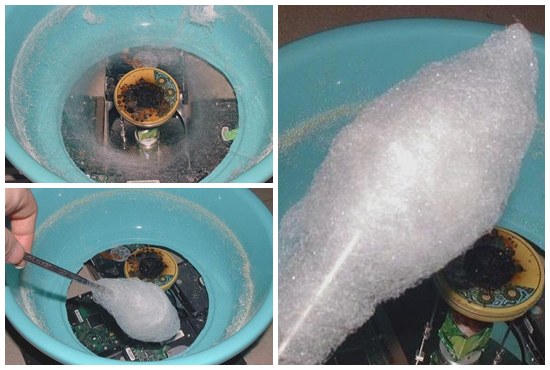
So, you've got an old disk drive sitting around. What can you do with it?
Make cotton candy, of course.
Turning an Old Hard Disk Into a Candy Floss Machine
John C. Wharton, a candy maker, and William J. Morrison, a dentist, received a patent in 1899 for "certain new and useful improvements in candy machines." (US Patent # 618,428). This bit of hackery builds on that patent with modern tech and spare parts.
via LifeHacker

One of an occasional series of best uses and reuses for old computer gear and related stuff.

Wednesday, May 02, 2012

Notes on the future of work

This morning, we learn from Kevin Kelly in Why can't a machine do this?
If there is pressure to increase the productivity of human workers, the serious question to ask is, why can't a machine do this? The fact that a task is routine enough to be measured suggests that it is routine enough to go to the robots. In my opinion, many of the jobs that are being fought over by unions today are jobs that will be outlawed within several generations as inhumane. (His emphasis)

Of course, robots in the workplace aren't new. We're seeing a lot of robot news stories. Increasingly, those stories are written by robots. (The stories are written by computer programs, which are not literally robots. See the next paragraph.) A Chicago company is using algorithms to write news stories, starting with the sports. It pretty much works, right up to and including the expected cliches. Read more (written by an alleged human) at Can an Algorithm Write a Better News Story Than a Human Reporter?.

Robots are also reading and grading school papers. According to Michael Weinerip, in his NYT piece, Facing a Robo-Grader? Just Keep Obfuscating Mellifluously, these robotic reviews aren't very good at picking up grammatically correct, but factually flawed sentences. Then again, neither is the typical George Will reader.

And, then, well, er, um, here's this news: Researchers Claim Sex Robots Will Be Future Of Sex Tourism. The researchers are Australian, but the CBS affiliate in Las Vegas picked up the story. Dennis Hof, owner of the Bunny Ranch, doesn't think that robots will put his employees out of business. He told the TV station,, that a man mostly wants attention from a woman. "He wants to tell her stories, wants her to listen, wants her to act like she cares – a robot’s not going to do that.”

Meanwhile, over on Shiny Shiny, we learn that Panasonic wants to replace your hairdresser with a robot:


This seems like a good time to be nearer the end of a career than the beginning. It'll be good to get away from the increasingly robotic world and onto a retirement filled with hobbies and friends and memories and, oh, snap.


GeckoSystems CareBot™ helps to alleviate caregiver shortage for Japanese elderly.
Saturday, February 18, 2012

Laptops, the next generation

We've heard that tablet computers may overtake laptops in sales by 2015, plus or minus a year. I mentioned this in a conversation the other evening. Everyone over the age of 15 said that they'd have a difficult time working without a regular keyboard.

Fortunately, this be the era of technological bedazzlement, there is no need for which a silly product cannot be invented.

Therefore,  we have jeans with a keyboard woven in the fabric and a USB wireless connection. (Tablet users may need a special adapter. At this point, however, an extra dongle should be the least of your concerns.)


The designers have yet to make manufacturing deals that would allow for mass production.
Let the "mouse in your pocket" jokes begin.

Wednesday, April 07, 2010

If you chance upon this checkbox, ...

Do not click.
In case you're wondering what will happen (or what just happened), you set up a non-virtuous feedback loop between your computer's speakers and microphone.

Saturday, February 27, 2010

It followed me home. Can I keep it?

Last Saturday we happened upon an indoor fleamarket where, among a industrial garage bay full of stuff, I found an old Compaq Presario. The box didn't have a price tag on it and the woman running the market didn't have an idea on a price. So, for $20, I brought home something that I barely need.
It turned out to have a working copy of Windows XP on it. The young woman who'd previously owned the system didn't leave anything of concern on it, except for a couple of pictures that she'd likely not want to show to her mother or grandchildren. (BTW, if you have physical access to a system, it's trivial to find out what's on it, even if the account is password protected.)
That XP worked at all is remarkable because this system has 186MB of memory. The disk is 40GB, suprisingly large for a low-cost machine and plenty of room to install Linux on a separate partition.
The BIOS was updated in 2000 and I've not been able to find a later version. Because some of the controllers were old, standard installations didn't work well; even the live CD balked. I was able to install a minimal Ubuntu server configuration and load the rest of modules over the network. Within a half hour, I had a working home web server.
Now that the system is operational, I turn off the monitor and just let it run quietly amid the other clutter in the office.
It's not quite as old as the one that Donald Knuth first used or even the ones that the Secret Service has in their employ, but it's old.
Here's Dilbert from the date of the BIOS:
Dilbert.com

Wednesday, December 23, 2009

More on software, printers, and operating systems

Last week, we had an old printer in the attic, a black and white laser printer that was never really a favorite and a noisy little all-in-one color printer in our office, and an old flatbed scanner in a cupboard in the cellar. The attic dweller, a delightful little Lexmark laser printer, and the venerable flatbed that's great for scanning 35mm slides, were exiled because our Vista desktop system didn't support them.
So, in an effort to simplify our lives and clean out unused stuff, I :

  1. Asked Google what I think of Vista

  2. Optioned the attic printer and office laser to a flea market to be named later.
  3. Watched the noisy little all-in-one quietly display Ink System Failure 0xc19a0023 on its status window.
  4. Brought the office laser back from the out-going queue.
  5. Sent the all-in-one to that wonderful, magic place called Away.
  6. Spent an hour in the rag-and-bone shop of Linux device configuration but was rewarded with a working flatbed scanner. (Installation on Vista persistently and unequivocally failed.)
  7. Bought a new HP all-in-one. 
  8. Spent an hour trying to install the HP software on our Vista desktop system, hitting an error because the HP software was trying to configure the Windows Firewall, which isn't running and couldn't start, because I have other anti-virus/firewall software, but no matter because the HP software could only think about the Windows Firewall, and, after the configuration failed, uninstalled itself and put up a useless set of troubleshooting tips.

  9. Spent barely 30 seconds installing the all-in-one as a network printer on my Linux system.
  10. Re-optioned the office laser printer to the outgoing queue.
  11. Printed this picture of Cassie and Sandra on our new all-in-one while sitting at the table by the window downstairs.

Is my life simpler? You betcha.

Blog Archive